January 5, 2023

Description
Hello builders,
that is my redesign of the British army's original Mark IV tank from WWI. I hope you enjoy it. I designed this robot for half a year. It was my first thing I ever designed. I had a lot of setbacks, but I finally made it. I build it for a science competition, but I didn't nail it in time. Furthermore, I designed it in Tinkercad. First, I was awful in the designing. I mean really awful. And I thought Tinkercad is the best 3D design program in the world;). I had a lot of trouble getting the right tolerances. But now I know it better. It was a hard time designing it because the program isn't the best program for doing complex designs. I threw a lot of filaments away, but I think it was worth it. So now you can make the finished model yourself.
What you need:
Arduino Nano Version
OR
Esp Wi-Fi Controlled Version
What you need for either:
If you don't want to solder your own PCB, you can use my Gerber file for the Arduino or the Wemos D1 mini. Otherwise, you have to order one of these.
You should print these parts with an infill of over 15%. Print the walls with brim or raft because otherwise they sometimes start to lift a bit. All the chain links have to be printed with support and brim or raft. The torso also has to be printed with support.
*How often you have to print the part.
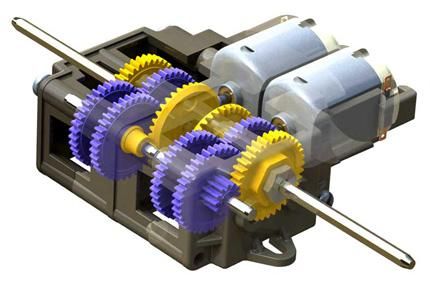
Take an inner wall and an outer wall from the same side. Put nails through every hole at the marked places. Push the gears with the small holes on the nails. Then take the front axes and push them in with the gear. After that put the inner wall onto the nails and push it carefully until it is in its place. Then cut the protruding ends off. Repeat this process for both sides. Be careful when cutting because of the flying metal parts.
Now you have to set the right configuration of the gearbox. The instruction for this can you find in the box. You should use a gearration of 344,2 : 1. Use the provided grease and not too little of it.
Take a candle and hold it under the metal axes of the gearbox and heat them a bit. Now take the back gear and hold it between the connected sidewalls at the end. Push the hot end of the axes through the hole in the back gear and repeat this process until it fits very well. Now repeat it for the other side.
Now take the right sidewall and put some glue into the notch. Press the torso into the notch. Hold it until it is connected together. Repeat the process for both sides.
Take two cleaned(the support is removed) chain links and push the thin wires throw the four holes. If the wire don't go throw take a 1 mm drill and try to remove the filament, that prevents the wire from going throw. After this, bend both ends of the wire until the wire can't fall out and cut the ends with a plier. Now you have to do this for every chain link. For me, this process took over 4 hours. So bring some time with you.
The Arduino Version can only be programmed and run a specific routine, that you can change how you want.
Arduino Ide(to flash the code to the module)
For this Version solder the components to a solderingplatte how you can see in the two first pictures.
You only need my provided file and flash it to the Arduino and the tank will start.
That is the easier version, but you can't do as much as with the Wemos D1 Mini Version, because it can all do what the Arduino Version do.
The Wemos D1 Mini Version has Wi-Fi and creates a webserver to controll the tank.
Arduino Ide(to flash the code to the model)
For this Version solder the components to a solderingplatte how you can see in the two first pictures. You don't have to use srew terminals, but they make the job easier, and they look professional.
To set it up, you have to input your wifi-passwort and wifi-name. You only have to start the Wemos D1 mini and the webserver will be created.
(*If you don't know how to set up the Arduino Ide for the Wemos D1 Mini use this small tutorial.)
You need some door and window seals for this step.
Cut the seals in 21 mm strips. Glue the strip to one chain link.
Do these for every chain link (110 times). That was a very hard part of the build.
Why you should use window seals?
Window seals give your tank some extra grip to overcome a higher obstacle with a wider angle. You can drive the wall up until the double height of the tank, so you can overcome stairs.
Burned battery pack!!!
You have to look out for not taking the wrong battery pack or a too small one. In my first driving attempt, I used a too small battery pack with only one battery and melt the plastic of the case. So keep in mind that you have enough power when you use the tank.
Check out my Video to see the tank driving and climbing. It was a really cool but challenging project for me. I learn a lot and I hope to be able to use this knowledge in future projects. I hope you enjoy this Instructables and have fun to build it. Let me know in the comments what you think or if you have any question? Thank you for reading.
Do Something!
License:
Creative Commons — Attribution — Share Alike
8




 Max Siebenschläfer