• Models
  • Contests
  • Slicer
  • Login
  • Start Here
    thingiverse-iconprintables-iconcults3d-iconmakerworld-iconmyminifactory-icon

    3D GO

    3D ModelsContestsCollectionsSaved ModelsOn a mobile device?

3D GO

Privacy Policy
FlashForge Finder With Cura 3D Printer File Image 1
FlashForge Finder With Cura 3D Printer File Image 2
FlashForge Finder With Cura 3D Printer File Thumbnail 1
FlashForge Finder With Cura 3D Printer File Thumbnail 2

FlashForge Finder With Cura

Waikikiprod avatarWaikikiprod

April 12, 2023

printables-icon
DescriptionCommentsTags

Description

_______________________________________

🇬🇧 In English 🇬🇧 (In french below 🇲🇫)

_______________________________________

Create the Flashforge Finder on Cura

Step 1 :

In Cura, create a new printer in the "preferences" tab

Step 2 :

Choose in the “Custom” category the printer “custom FFF Printer” and name your printer

Step 3 :

Then adjust the printer settings as below.

And copy/paste the start and end gcode below.

Start GcodeEnd Gcode

xgcode 1.0

;start gcode

M140 S0

M104 S{material_print_temperature} T0

M104 S0 T1

M107

G90

G28

M132 X Y Z A B

G1 Z50.00 F400

G161 X Y F3300

M6 T0

M907 X100 Y100 Z40 A80 B20

M108 T0

G1 Z.20 F400

M104 S0 T0

G90

G1 Z140 F3600

G28 X Y

M132 X Y Z A B

G91

M18


step 4: Import profiles and materials

Download the 3 Flashforge finder profiles:

  • 0,1mm Super quality 
  • 0,2mm Standard quality
  • 0,3mm Low quality

Download Materials Profile 

  • PLA+ for Finder

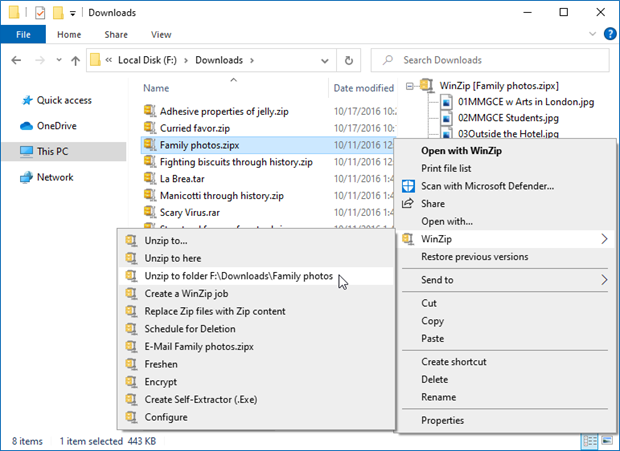
step 5: Unzip the files

tuto

step 6: import the profiles into Cura

step 7: import the material


Follow me on Instagram / Facebook / Beacons 

Discover My Best 3D Models

Axe MagnetATLAS - The universal strong spool holderThe Ultimate Fidget Avocado keychain

_______________________________________

🇲🇫 En Francais 🇲🇫

_______________________________________


étape 1 : Créer la Flashforge Finder sur Cura

Dans Cura, créez une nouvelle imprimante dans l'onglet "préférences"

étape 2 : Choisissez dans la catégorie “Custom” l'imprimante “custom FFF Printer” et nommez votre imprimante

étape 3 : Réglez ensuite les paramètres de l'imprimante comme ci-dessous.

Et copiez/collez le gcode de début et de fin ci-dessous.

Start GcodeEnd Gcode

xgcode 1.0

;start gcode

M140 S0

M104 S{material_print_temperature} T0

M104 S0 T1

M107

G90

G28

M132 X Y Z A B

G1 Z50.00 F400

G161 X Y F3300

M6 T0

M907 X100 Y100 Z40 A80 B20

M108 T0

G1 Z.20 F400

M104 S0 T0

G90

G1 Z140 F3600

G28 X Y

M132 X Y Z A B

G91

M18


étape 4 : Importer les profils et matériaux

Télécharger les 3 profils de la Flashforge finder :

  • 0,1mm Super quality 
  • 0,2mm Standard quality
  • 0,3mm Low quality

Télécharger le profil de matériaux 

  • PLA+ for Finder

étape 5 : Décompressez les fichiers

tuto

étape 6 : importer les profils dans Cura

étape 7 : importer le matériau 


Follow me on Instagram / Facebook / Beacons 

Discover My Best 3D Models

Axe MagnetATLAS - The universal strong spool holderThe Ultimate Fidget Avocado keychain

License:

Creative Commons — Attribution — Noncommercial — Share Alike

Related Models

#3DBenchy - The jolly 3D printing torture-test by CreativeTools.se preview image

#3DBenchy - The jolly 3D printing torture-test by CreativeTools.se

CreativeTools profile image

CreativeTools

91,010

Important information sign for 3D printers / Wichtiges Hinweisschild fĂĽr 3D-Drucker :) preview image

Important information sign for 3D printers / Wichtiges Hinweisschild fĂĽr 3D-Drucker :)

Pat_S profile image

Pat_S

3d Printer Printing 3d Printer preview image

3d Printer Printing 3d Printer

JAJMWHungFamily profile image

JAJMWHungFamily

970

Self-Watering Planter (Small) preview image

Self-Watering Planter (Small)

parallelgoods profile image

parallelgoods

73,222

X, Y and Z calibration tool for IDEX / dual extruder / dual color 3D printers preview image

X, Y and Z calibration tool for IDEX / dual extruder / dual color 3D printers

Voxel3D_NL profile image

Voxel3D_NL

208

sign: don't touch my 3d printer preview image

sign: don't touch my 3d printer

Izzodesign74 profile image

Izzodesign74

691

All In One 3D Printer test preview image

All In One 3D Printer test

majda107 profile image

majda107

64,564

axes calibrage cube-xyz for 3d printers preview image

axes calibrage cube-xyz for 3d printers

H- printed profile image

H- printed

9

7