June 14, 2023

Description
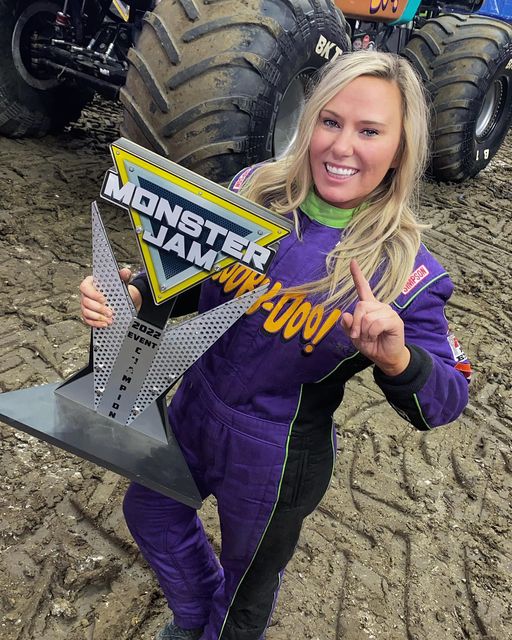
It'll be a bit of a puzzle putting it together, but I made a multi-color multi-layer replica of a trophy from Monster Jam as a momento for my boys after we went recently. The "Example" STL is just for reference!
Printer: Ender 3
Supports: No
Resolution: .2
Filament: Hatchbox PLA Silk Gold, Pure Black, Pure White, Cool Gray, Silk Silver
Notes:
The bolts suck to print, but I wanted them a different material so there are actual holes in the models for the bolts to be glued in to. I suggest putting them all close together with a super-wide brim if you're going to try to print them. I clipped mine out with the Ender clippers and shaved a tiny bit here and there with a knife.
If you print anything on the 'name plate' piece, it'll be a color swap. I put the year and my kid's names on it as it's for them.
Assembly Tips
Glue the black triangle to the silver triangle first. There's an inlay that it fits into, which allows you to then glue the black/silver triangle pieces on to the gold (supposed to be yellow) triangle perfectly.
I had to use a 1.7mm drill bit to clean up the inside of the bolt holes due to some printing inconsistencies. They might not be sized right, the bolts might have been out of dimension, I'm not entirely positive. You could always just print little hexagons and glue them over the holes.
I used the base kickstand as a spacer to get the MONSTER letters lined up, working from the outside-in and then again as a spacer below that to get JAM lined up. I almost got it right, too. Don't let rambunctious seven year olds jump around you while gluing things together 😪
For the base, I started by carefully dry-fitting everything together. I glued the long edge of the wings to the black vertical support, then all of that to the grey base. Added the nameplate to the front, and finally glued the kickstand to the back. Optionally you could glue everything in to the base, but for me it was a fairly snug fit and being able to make this fairly flat in the event we need to pack it up would be nice so I didn't.
At the rally they had an awards ceremony and for a brief second they showed the trophy they awarded. I found a picture from last year of someone holding a very similar trophy, and built the rest in Tinkercad looking at that picture and the official logo image from their website. I found a free font that appeared to be an exact match to the official logo text, so used that to create the letters and then give them spacing for inlay against the triangles.
License:
Creative Commons — Attribution — Noncommercial — Share Alike




 RevHazlett