August 27, 2018

Description
[11/7/2019] Updated to version 3; it has many of the same upgrade features present in Thanhos and Thanhlonv2.
This is a modular, disassemblable, tool-less, glue-less, screwless, half-dart mag based on the Katana platform. Utilizes a constant-tension coil spring, provided courtesy of Foamblast. They are also compatible with any traditional half dart magazine box spring (just make sure you glue in the base). Glue recommended
If you like any of my designs, please leave a tip paypal ven
ASSEMBLY: (https://www.youtube.com/watch?v=ht3hAocoWBE)
SUPPORTS:
None, but recommended for unupgraded cooling. Only do supports from build plate, and only for overhanging bevels
QUALITY SETTINGS:
Between 0.2 layer, 0.4-0.5 line width. >15% support density, ample cooling
NOTABLE FEATURES:
"Knurling":
These mags feature a type of pseudo knurling/guide-rail pattern on the inside walls to help smoothen feeding. The biggest reason friction builds up from inserting too many darts is because they rub on the inside walls; changing the grain orientation on the surface that makes contact with the darts into being parallel with the movement of the darts makes a profound difference.
These tiny lines tricks your slicer into making the print grain parallel to dart travel. It's very important to play around with your slice settings and in/decrement them by .01 so that they render, and with only your very top layer should have the vertical lines. This feature helps control the top wall print orientation on a multitude of setups without complications of having to manually mess with wall orientation settings.
Antisheering Dovetails:
Locking tabs now feature friction fitting concave and convex grooves along the sides to help lock in the dove tails and protect against sheering motion.
Second mag catch slot:
There is a secondary lower mag slot that's in-line with Hasbro's mag release position. Intended for when you can just shorten your blaster and ditch the adapter. Meaker MK15 e.g.
Jungling:
You can stick the mags end-to-end and "jungle" them through the ExtensionSleeve.
Membrane Window
Initial few layers on the central channel creates preview window, utilizing the translucency of fully fused bottom layers. Put at least two layers criss-crossing diagonally for the best rigidity and transparency. This doubles as rigidity to protect from the walls flexing inward and jamming the follower (which is a problem in actual Jet katanas).
Vase Mode
Using the Spiralize Outer Controur option or "vase mode", you can slice the included sleeve files labeled vasemode (OPTIONAL) in order to get super clean low profile vases. Super fast to print, beautiful, and surprisingly durable.
TROUBLESHOOTING TIPS:
If sleeve too tight:
Likely sagging, or the detents are rough, or bulged; this will wear over use. Or, the mag is too wide, and your Z is different than the file. You can insert one half of a body into a sleeve to check if it's a z tolerance or a xy tolerance
Expanded capacity jams:
When using the extension sleeves to increase capacity, manually inspect inside wall of the mag to make sure there are no burs (especially the interface edge where mag bodies contact each other), the path of the follower's nub should be smooth and uninterrupted. Sandpaper is your friend, do a quick wipe to make sure the inner walls isn't grainy.
Dovetails Too Loose
If the dovetails are too loose, you can use a lighter to warp the ends downward so they contact.
Bottom base sleeve too loose
Boil the base sleeve for 10 seconds; your print will contract by a few microns in the xy
Fitting spring in
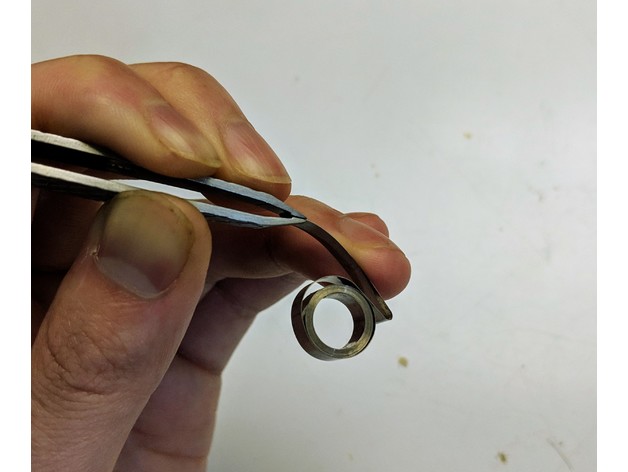
Sometimes drum springs will be concave outward and the sharp edge will catch against the walls, resulting in difficulty fitting them into the spring rest. You can easily just crease the tab inward so it doesn't catch against the back wall
In case the spring rest sags too much during the bridging, such that you can't insert the tab of the spring through; just gently melt that bridge with a lighter and press it up with a toothpick.
Too tight for adapter
Printed adapters will often vary with dimension because they're tighter and shrink more. To compensate, you can shrink one half by as much as <2% Z (or onelayer) and they'll still click together, and gravity drop better.
License:
Creative Commons - Attribution - Share Alike




 Thanhtacles